Modernize your IT system. Keep your ERP.
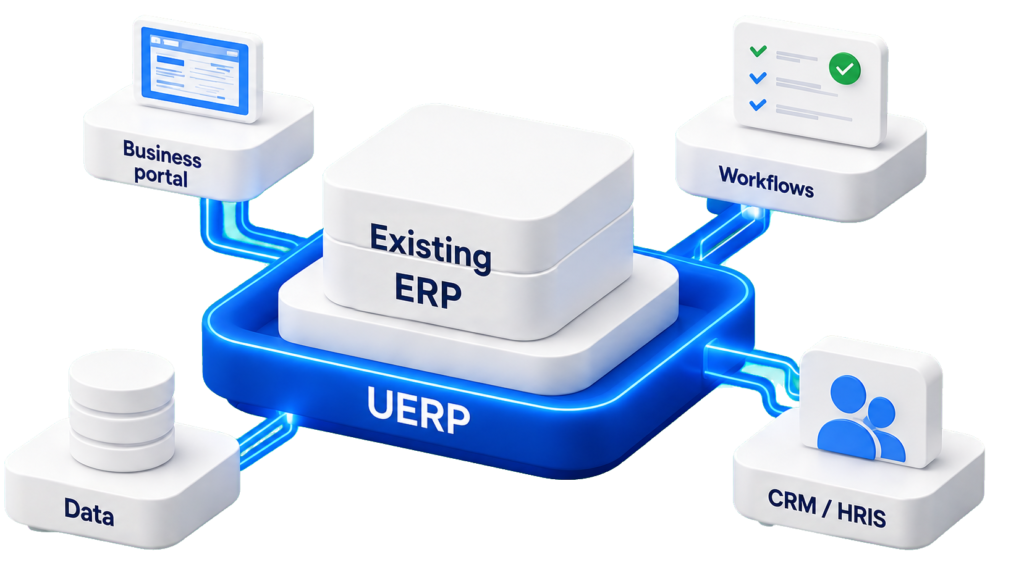
Modernize your ERP without replacing it: UERP connects your existing applications, automates your processes, and adds features that benefit your teams. Upgrade your information system gradually, without a sudden migration.
TAKING WHAT WE HAVE AND BUILDING ON IT
Your ERP remains essential.
Your needs go beyond that.
Your ERP system organizes your operations. But some processes fall outside its scope: internal requests, approvals, operational follow-ups, or communication between departments.
UERP provides the additional features your teams need, building on the tools you already have in place.
Changes that are slow in coming
New business needs are piling up, while teams are coming up with more and more workarounds.
Processes that spill over
Excel, emails, and manual approvals bridge the gap between applications.
Scattered data
Information remains scattered across multiple tools. It takes time to get a complete picture.
THE UERP APPROACH
How can you modernize your ERP without replacing it?
A modular layer that wraps around your IT infrastructure, deployed according to your priorities. UERP connects your applications and adds useful features without requiring you to replace everything.
Connect your apps
Integrate ERP, CRM, HRIS, finance, payroll, CMMS, and line-of-business tools based on your IT system’s integration capabilities.
Add the missing functions
Create portals, low-code interfaces, and add-ons tailored to your teams' day-to-day work.
Orchestrating Business Processes
Share data, automate validations, and coordinate workflows between your applications.
USE CASES
One first use. One tangible change.
Automate a purchase request
The request is entered once, after which it goes through an approval process connected to your ERP system. Each stakeholder can view the relevant information and the status of the request.
Request
Validation
ERP
Follow-up
Create a portal connected to your tools
Employees, customers, and partners have a single point of access to submit their requests and track their status. The portal exchanges relevant information with your existing applications.
Portal
Request
Treatment
Answer
Turning an Excel spreadsheet into a business application
Replace a critical tracking file with a structured application. Teams work on shared data, with clear responsibilities and defined steps.
Data Entry
Shared Data
Workflow
Pilotage
A GRADUAL ROLL-OUT
A priority process to get started
Start with a manageable scope, test it with your teams, and then gradually expand. Each step allows you to validate the use cases before moving on to the next one.
1
Identify the need
Choose a specific process that involves tight deadlines, repetitive data entry, or manual tasks.
2
Connect the tools
Identify the relevant applications, the data to be exchanged, and the access rules.
3
Automate workflows
Set up the steps and validations, then test the workflows with the teams.
4
Expand gradually
Adjust the initial implementation and reuse the relevant building blocks for other processes or entities.
THREE APPROACHES
What path should your IT system take?
Traditional ERP Migration
Redesign the core system, migrate the data, and coordinate the transition to a new environment.
Standalone applications
Address specific needs with additional tools, the coordination of which still needs to be worked out.
ERP Enhanced with UERP
Supplement existing tools and integrate processes through a phased rollout.
Who is it for?
For existing information systems
An approach tailored to organizations that want to modernize their workflows while retaining their essential applications.
· Public sector organizations
· SMEs & mid-market companies
· Multi-entity groups
· Certified public accountants
· Ports & logistics
Finance, HR, operations, and IT move forward together, based on a shared business need.
SECURITY & GOVERNANCE
Stay in control of your data
YOUR FIRST PROCESS
Which process should we start with?
Let's discuss your tools, needs, and priorities to identify the first process to connect or automate.
A French and sovereign solution
Secure hosting in France
Compliant with the GDPR and industry standards
Local Support and Expertise